Introduction
“Where is my Buddy” is a buddy discovery app designed for individuals learning to code, helping them find like-minded peers on Discord based on shared interests extracted from Discord, GitHub, and Facebook profiles. The app prioritizes user anonymity by using Discord login as the identity source and utilizes other social profiles solely for interest-based matching. Users can customize their preferences with tags like beginners, experts, etc., ensuring better suggestions. The primary objective of this app is to enable the discovery of buddies to learn new things together.
MVP User Stories
Login and Profile Management
- Users should be able to log in using Discord OAuth.
- Users should be able to update their basic profile (age
, avatar) along with learning interests, timezone information, and languages spoken (e.g., English, Portuguese). - Users should be able to import languages used in GitHub projects using GitHub profile import.
- Users should be able to update match preferences by age, timezone, and custom learning interests.
- Users should be able to claim an existing profile if it was scraped from Discord to create the initial user base.
Buddy Discovery
- Users should be able to discover 4 new profiles every 6 hours in a single session, with a maximum of 16 profiles per day.
- Users should be able to like up to 3 profiles per day.
- Upon right swipe (like), a message is sent to the liked user on Discord from the user’s Discord profile, along with a link to our application.
- Users can block a user, resulting in a block on Discord as well.
Container Diagram
The system architecture for “Where is my Buddy” is divided into several containers, each serving a distinct purpose within the application.
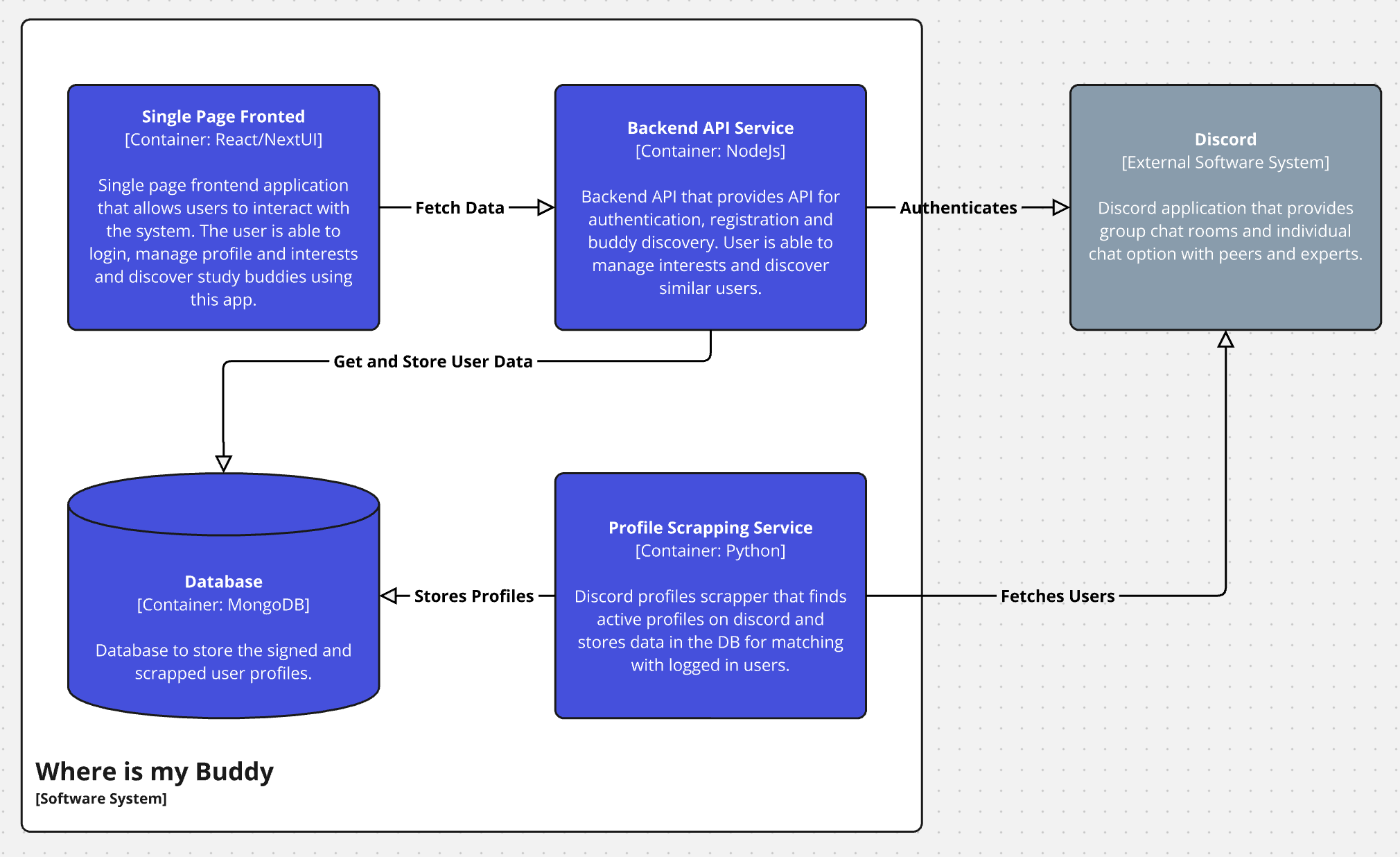
- Single Page Frontend App (React/NextUI) - A single-page frontend application that allows users to interact with the system. The user can log in, manage their profile and interests, and discover study buddies using this app.
- Backend API (NodeJS) - A backend API that provides endpoints for authentication, registration, and buddy discovery. Users can manage their interests and discover similar users through this API.
- Database (MongoDB) - A database used to store signed-in and scraped user profiles.
- Profile Scraping Service (Python) - A Discord profile scraper that finds active profiles on Discord and stores the data in the database for matching with logged-in users.
- Discord (External Software System): - The Discord application provides group chat rooms and individual chat options with peers and experts.
Component Diagram
The backend API is further broken down into specific components, each responsible for different aspects of the application’s functionality.
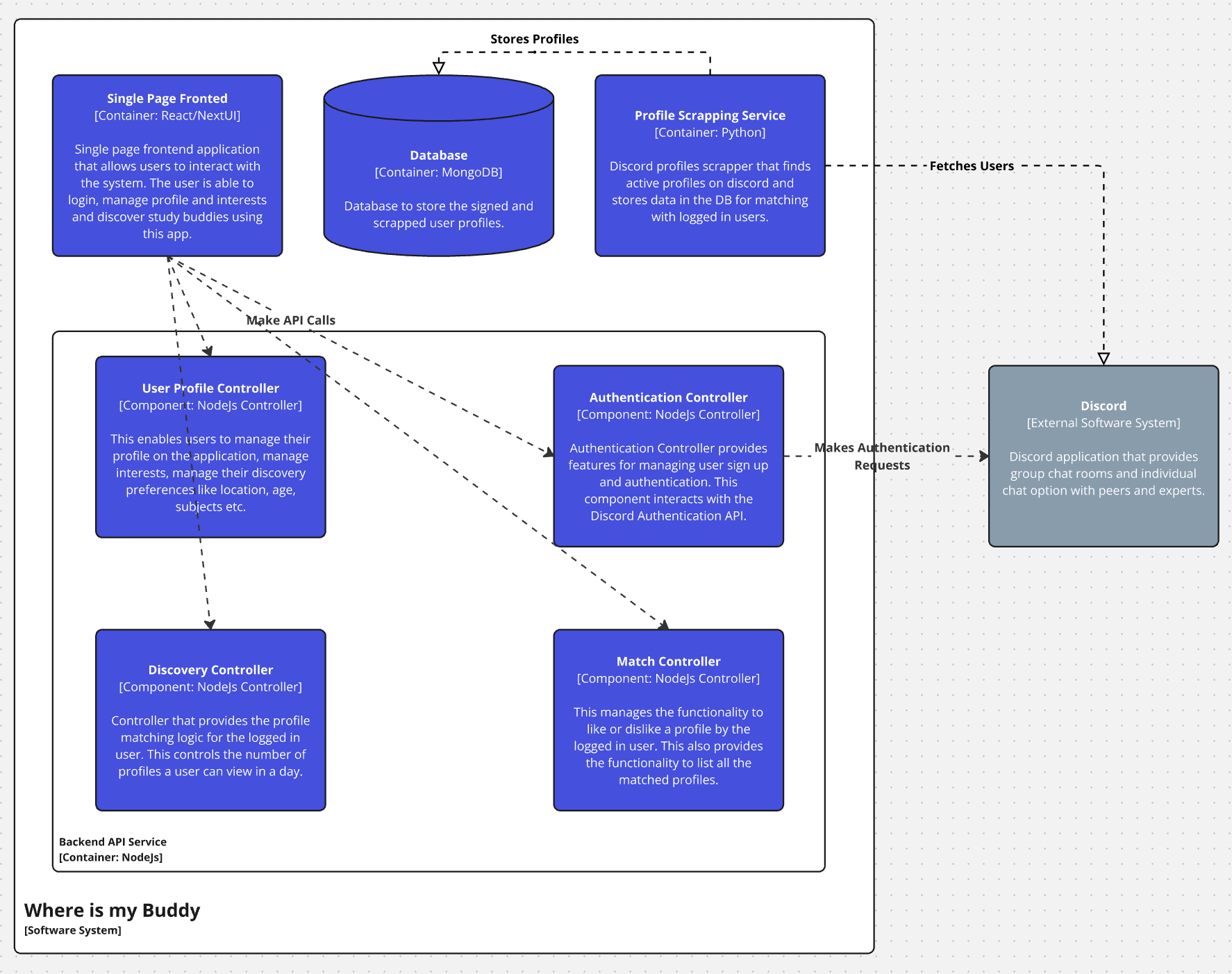
- User Profile Controller [NodeJs Controller]: - This component enables users to manage their profile on the application, including managing interests, discovery preferences like location, age, subjects, etc.
- Authentication Controller [NodeJs Controller]: - The Authentication Controller provides features for managing user sign-up and authentication. This component interacts with the Discord Authentication API.
- Discovery Controller [NodeJs Controller]: - This controller provides the profile matching logic for logged-in users, controlling the number of profiles a user can view in a day.
- Match Controller [NodeJs Controller]: - This component manages the functionality to like or dislike a profile by the logged-in user and provides the functionality to list all matched profiles.
Conclusion
The high-level design of “Where is my Buddy” outlines a clear structure for the MVP, focusing on critical components such as user management, authentication, and buddy discovery. With a robust backend and a user-friendly frontend, this application aims to make finding a study buddy both intuitive and efficient.