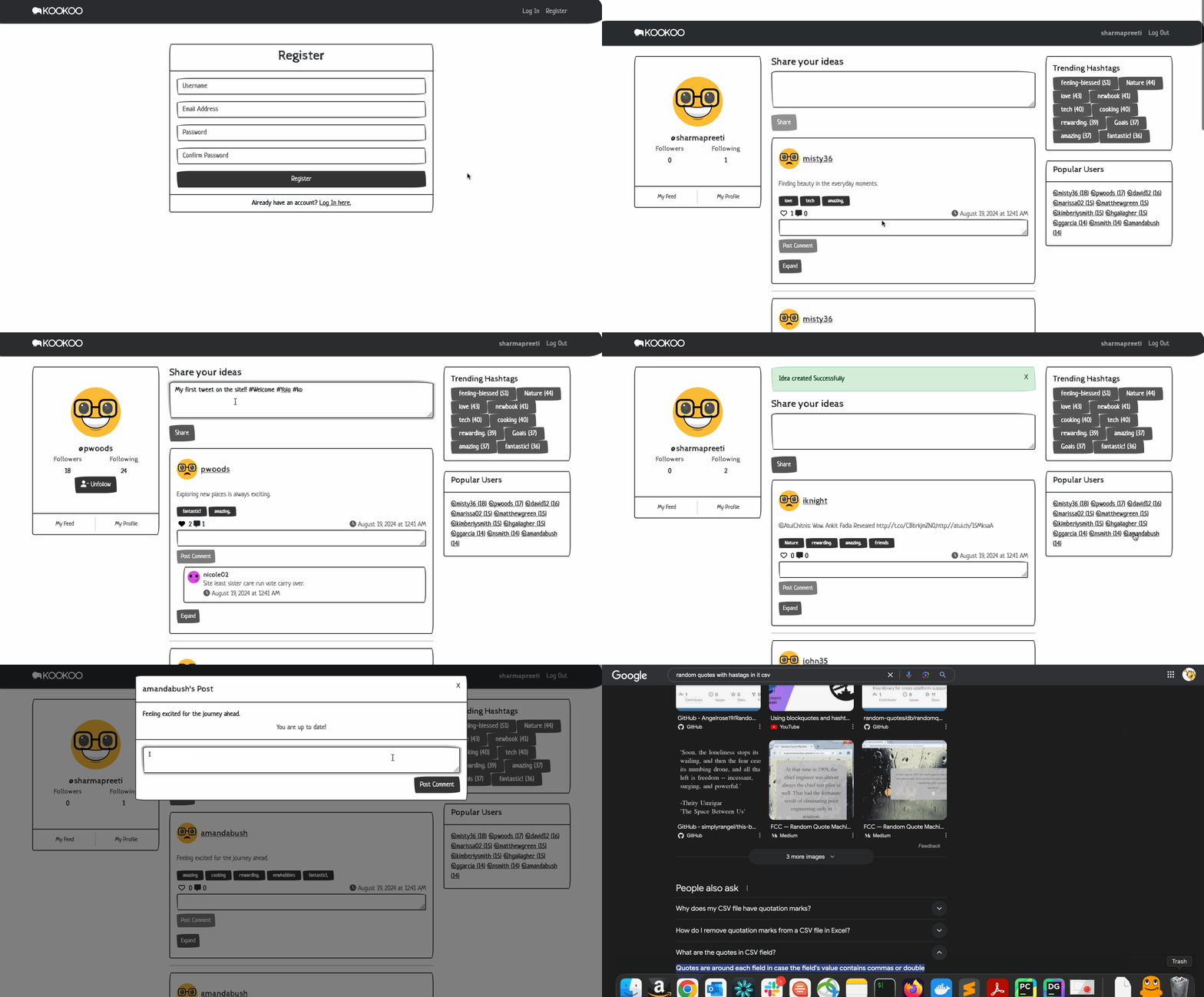
Creating a social media platform like Twitter might seem daunting, but with modern web frameworks and tools, it’s more accessible than ever. In this blog post, I’ll walk you through the development of “Kookoo,” a Twitter-like platform. I’ll cover everything from setting up the models to handling user interactions like following, commenting, and liking posts. I’ll also delve into some of the more nuanced features, such as trending hashtags and popular users.
Getting Started with Django
Project Setup
We began by setting up a Django project. The first step was to create the basic structure, including models that represent users, posts, comments, likes, and followers. Django’s powerful ORM made it easy to define these relationships.
Here’s a snippet of the initial setup for the User model, which extends Django’s AbstractUser:
from django.contrib.auth.models import AbstractUser
from django.db import models

class User(AbstractUser):
    pass
This was a simple start, but it laid the groundwork for more complex features.
Implementing Core Features
Posts and Comments
The backbone of Kookoo is the ability to create and interact with posts. We defined a Posts model to store each post’s content, timestamp, and the user who created it:
class Posts(models.Model):
    content = models.CharField(max_length=64, blank=False)
    timestamp = models.DateTimeField(auto_now_add=True)
    created_by = models.ForeignKey(User, on_delete=models.CASCADE, related_name="user_posts")

    def __str__(self):
        return f"{self.created_by} at {self.timestamp} wrote {self.content}"
Comments were implemented similarly, with a Comment model linked to both the post and the user:
class Comment(models.Model):
    post = models.ForeignKey(Posts, on_delete=models.CASCADE, related_name="comments")
    text = models.CharField(max_length=500, blank=True)
    created_by = models.ForeignKey(User, on_delete=models.CASCADE, related_name='commented')
    timestamp = models.DateTimeField(auto_now_add=True)

    def __str__(self):
        return f"{self.text} -by {self.created_by}"
Liking Posts
Users can express their appreciation for a post by liking it. The Like model connects users to posts:
class Like(models.Model):
    post = models.ForeignKey(Posts, on_delete=models.CASCADE, related_name="likes")
    liked_by = models.ForeignKey(User, on_delete=models.CASCADE, related_name='liked')
    timestamp = models.DateTimeField(auto_now_add=True)
Following Users
Following other users is a core feature in any social network. We created a Following model to manage these relationships:
class Following(models.Model):
    user = models.OneToOneField(User, on_delete=models.CASCADE, related_name="follow_instance")
    following = models.ManyToManyField(User, blank=True, related_name="followers")

    def __str__(self):
        return f"{self.user.username} is following {self.following.count()} users"
This model allows us to easily check if a user is following another and to query the users that someone follows.
User Feeds
One of the features we implemented was the user feed, which shows posts from users you follow. The logic for this was added to the all_posts view:
if _filter == "following":
    following_users = request.user.follow_instance.following.all()
    posts = Posts.objects.filter(created_by__in=following_users)
Trending Hashtags
To capture trending topics, we implemented a hashtag system. Hashtags are extracted from post content and linked to posts. We created a method to get the top 10 trending hashtags:
class Hashtag(models.Model):
    name = models.CharField(max_length=64, unique=True)
    posts = models.ManyToManyField('Posts', related_name='hashtags')

    @staticmethod
    def get_trending_hashtags():
        one_hour_ago = timezone.now() - timedelta(hours=1)
        hashtags = Hashtag.objects.filter(posts__timestamp__gte=one_hour_ago) \
            .annotate(num_posts=Count('posts')) \
            .order_by('-num_posts')
        return hashtags[:10]
Popular Users
We also added a feature to showcase the most popular users based on their follower count:
class User(AbstractUser):
    @staticmethod
    def get_most_popular_users(limit=10):
        return User.objects.annotate(num_followers=Count('followers')).order_by('-num_followers')[:limit]
This allowed us to highlight the top users on the platform, providing additional engagement.
User Interface
Bootstrap Integration
To ensure the site was visually appealing and responsive, we used Bootstrap. This made it easy to create a user-friendly interface with minimal custom CSS. For instance, the profile section, where users can see their follower and following counts, was structured as follows:
<div class="card-body py-5">
    <div class="d-flex justify-content-center mb-3">
        <img src="https://api.dicebear.com/6.x/fun-emoji/svg" alt="Profile Image" class="rounded-circle" style="width: 120px; height: 120px; object-fit: cover;">
    </div>
    <h5 class="card-title mb-2">@{{ user.username }}</h5>
    <div class="d-flex justify-content-around">
        <div>
            <h6 class="card-subtitle mb-2 text-muted">Followers</h6>
            <p class="card-text">{{ followers_count }}</p>
        </div>
        <div>
            <h6 class="card-subtitle mb-2 text-muted">Following</h6>
            <p class="card-text">{{ following_count }}</p>
        </div>
    </div>
</div>
Handling User Interactions
We added dynamic elements to the user interface using JavaScript. For instance, when a user clicks on a username, the profile page of that user is loaded using the following function:
function load_profile(username) {
    fetch(`/profile_page/${username}`)
        .then(response => response.json())
        .then(profile => {
            document.querySelector('#profile-container').innerHTML = `
                <div class="card-body py-5">
                    <div class="d-flex justify-content-center mb-3">
                        <img src="https://api.dicebear.com/6.x/fun-emoji/svg" alt="Profile Image" class="rounded-circle" style="width: 120px; height: 120px; object-fit: cover;">
                    </div>
                    <h5 class="card-title mb-2">@${profile.username}</h5>
                    <div class="d-flex justify-content-around">
                        <div>
                            <h6 class="card-subtitle mb-2 text-muted">Followers</h6>
                            <p class="card-text">${profile.followers}</p>
                        </div>
                        <div>
                            <h6 class="card-subtitle mb-2 text-muted">Following</h6>
                            <p class="card-text">${profile.following}</p>
                        </div>
                    </div>
                </div>
            `;
        });
}
Populating the Database
To test the platform and ensure everything was working smoothly, we wrote a script to generate dummy data, including random users, posts, and interactions:
from faker import Faker
import random
from network.models import User, Posts, Comment, Like, Hashtag

fake = Faker()

# Generate Users
for _ in range(20):
    user = User.objects.create_user(username=fake.user_name(), email=fake.email(), password="password")

# Generate Posts with Hashtags
users = User.objects.all()
for _ in range(50):
    user = random.choice(users)
    content = fake.sentence()
    post = Posts.objects.create(content=content, created_by=user)
    hashtags = [word for word in content.split() if word.startswith("#")]
    for hashtag in hashtags:
        tag, created = Hashtag.objects.get_or_create(name=hashtag)
        post.hashtags.add(tag)
Conclusion
Building Kookoo has been an educational experience in leveraging Django’s capabilities to create a fully functional social media platform. From handling user authentication and interactions to implementing dynamic features like trending hashtags and popular users, Kookoo serves as a solid foundation for any developer looking to build a social networking site.
Whether you’re just starting with Django or looking to deepen your knowledge, creating a project like Kookoo is a great way to practice and refine your skills. If you’re interested in contributing to Kookoo or building your own version, the project is a rich playground for learning and experimentation.
Feel free to explore the code, try adding new features, and make Kookoo your own!